Sponsored


'23 A-Spec/Tech CVT

alphaecho17

Member
First Name
Andrew
Joined
Dec 2, 2025
Threads
1
Messages
5
Reaction score
1
Location
Orlando, FL
Car(s)
2023 CVT Liquid Carbon A-Spec w/Tech
Hi, all. So I'm a very new member here. I just bought a 23 A-Spec Tech CVT with 50,000 miles on it. Been driving it a week and absolutely no issues. I love it.

Since it's new to me and I don't know the entire maintenance history aside from regular oil changes, I had quite the day today trying to button everything up.

Step 1 was a visit to the dealer this morning for a CVT fluid flush and to take care of the recall. All was well and I drove it home with no problems. Along the way, I drove Florida's turnpike and all the driver assistance functions were working great.

Step 2 was to get a second key programmed as I bought it used and there was only one key. After I had been home for about an hour, I had a local locksmith come out and program the new key (now I have a Driver 1 and Driver 2 key). He did struggle with programming each key to the D1/D2 profile, but he did it, I think by wiping both keys clean and reprogramming both to the D1/D2 profiles respectively.

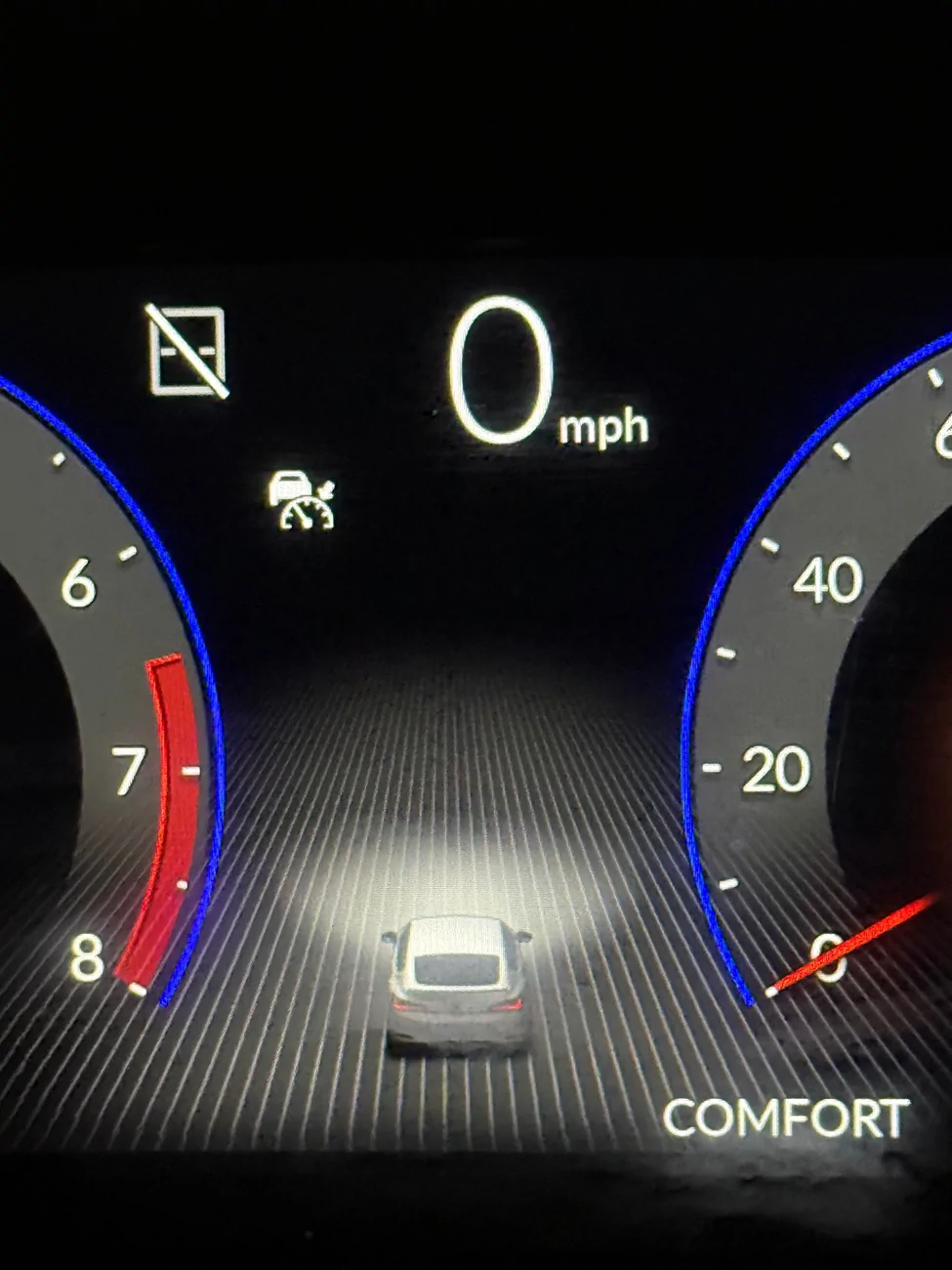
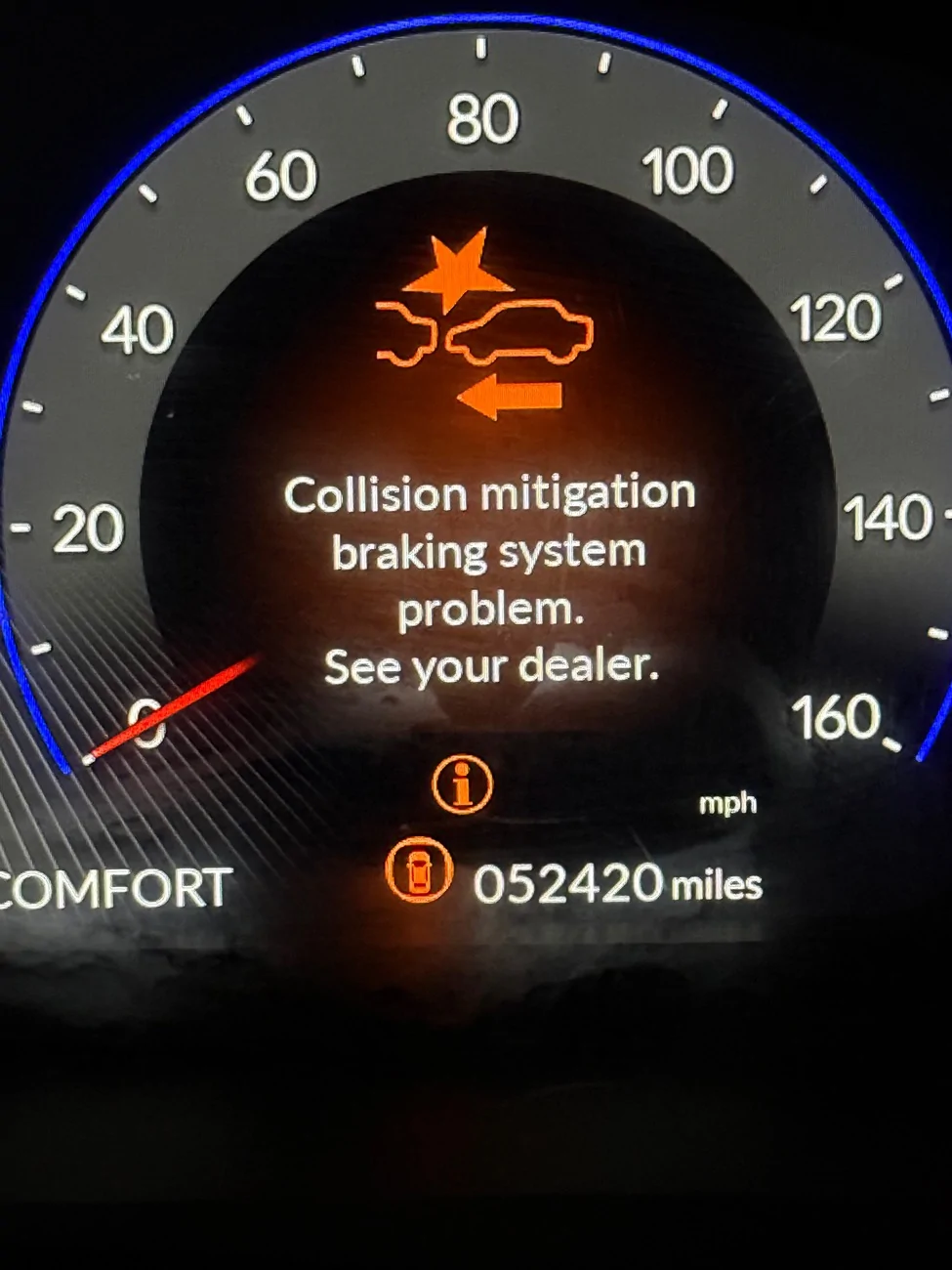
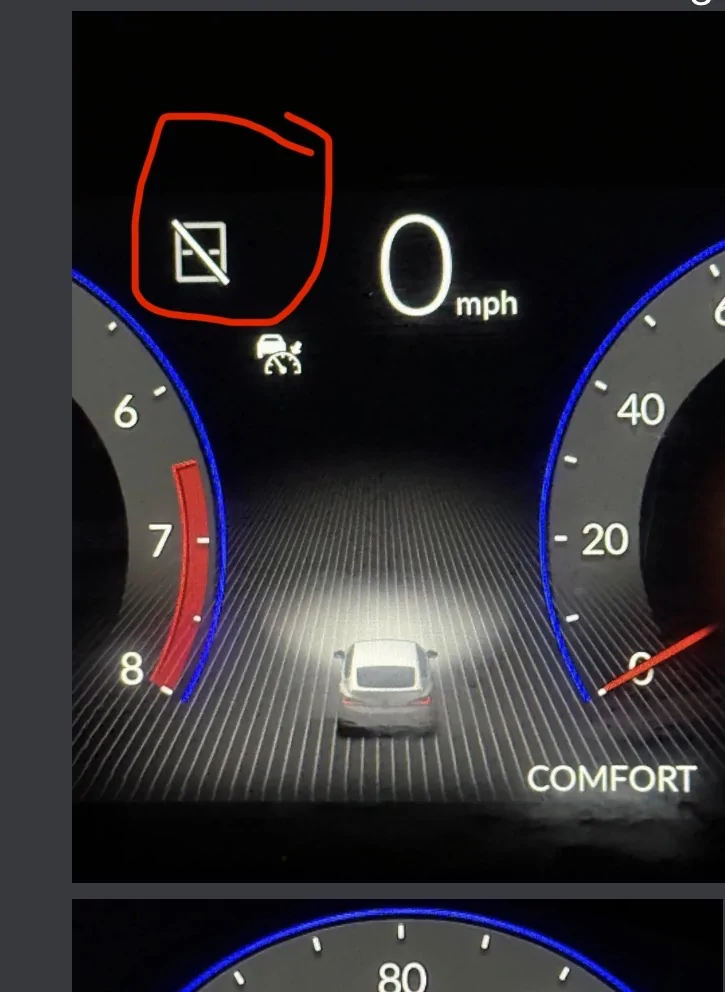
Then something weird happened. It started throwing these warnings: "Collision Mitigation Braking System Problem. See your dealer". Same for the "Road departure mitigation system". It drives OK otherwise. I even drove it out to dinner about 30 minutes away from home.

Neither of us could figure it out. I mean, he just programmed the key fobs, what does that have to do with the driver assistance features? Here's what we/I have done so far with no luck (this was all done at night and all within the last 4 hours):

1. Shut the car off, start again. Drive for a bit to "recalibrate". No change.
2. Disconnect battery, reconnect, start again, drive to "recalibrate". No change.
3. Went through all onboard settings. Can't find anything unusual.
4. Drove for approximately 30 minutes, parked, waited about 2 hours, restarted, still same warnings.

So, just a few hours ago all systems were working fine. I was even starting to get annoyed with the lane departure function. Now it doesn't even work at all and the only thing that changed was that key programming. It had to be that, but how. . .why. . .and how do I fix? So frustrating.
Acura Integra '23 A-Spec/Tech CVT IMG_3185
Acura Integra '23 A-Spec/Tech CVT IMG_3183
Sponsored


slowcountry

Senior Member
First Name
Dylan
Joined
May 19, 2025
Threads
2
Messages
120
Reaction score
56
Location
Arkansas
Car(s)
2025 Acura Integra ASpec (CVT)
As wild as it sounds... this happens for various reasons. You can fiddle with the perfect drive cycle, but each basically just drive it for 20 mins or so and let it cool overnight. In the morning the codes will be gone. If not, drive it on cold start and do your commute and that drive cycle should clear it.

I triggered it on mine when it went in limp mode from throwing boost leak codes. A friend did it on theirs when they forgot to plug in the MAF sensor on an air intake install. I did it again on mine when I forgot to plug in the pedal sensor after installing a pedal spacer. Another guy on here triggered it on his air intake install...so uhh, yeah, not sure how, but the key install could have caused it, Lol.

The workaround I found if you have a tuner... just reflash your tune. It's lazy, but only takes 2-3 mins.
 

UWU-mancer

Senior Member
First Name
UWU
Joined
Jul 17, 2025
Threads
3
Messages
137
Reaction score
90
Location
aurora colorado
Car(s)
type s
When my GTI freaked out like that it was cuz it needed an alignment and as a result all the sensors were off alignment
 
OP
OP

alphaecho17

Member
First Name
Andrew
Joined
Dec 2, 2025
Threads
1
Messages
5
Reaction score
1
Location
Orlando, FL
Car(s)
2023 CVT Liquid Carbon A-Spec w/Tech
As wild as it sounds... this happens for various reasons. You can fiddle with the perfect drive cycle, but each basically just drive it for 20 mins or so and let it cool overnight. In the morning the codes will be gone. If not, drive it on cold start and do your commute and that drive cycle should clear it.

I triggered it on mine when it went in limp mode from throwing boost leak codes. A friend did it on theirs when they forgot to plug in the MAF sensor on an air intake install. I did it again on mine when I forgot to plug in the pedal sensor after installing a pedal spacer. Another guy on here triggered it on his air intake install...so uhh, yeah, not sure how, but the key install could have caused it, Lol.

The workaround I found if you have a tuner... just reflash your tune. It's lazy, but only takes 2-3 mins.
Warnings were not gone this morning. Will connect my OBD reader when I get home this afternoon. Maybe I can just clear it?
When my GTI freaked out like that it was cuz it needed an alignment and as a result all the sensors were off alignment
As wild as it sounds... this happens for various reasons. You can fiddle with the perfect drive cycle, but each basically just drive it for 20 mins or so and let it cool overnight. In the morning the codes will be gone. If not, drive it on cold start and do your commute and that drive cycle should clear it.

I triggered it on mine when it went in limp mode from throwing boost leak codes. A friend did it on theirs when they forgot to plug in the MAF sensor on an air intake install. I did it again on mine when I forgot to plug in the pedal sensor after installing a pedal spacer. Another guy on here triggered it on his air intake install...so uhh, yeah, not sure how, but the key install could have caused it, Lol.

The workaround I found if you have a tuner... just reflash your tune. It's lazy, but only takes 2-3 mins.
Warnings were still there this morning. I will connect my OBD reader this afternoon when I get home from work. Maybe I can just clear it?
 

slowcountry

Senior Member
First Name
Dylan
Joined
May 19, 2025
Threads
2
Messages
120
Reaction score
56
Location
Arkansas
Car(s)
2025 Acura Integra ASpec (CVT)
Interesting - did you do a cold start drive?

I dont think the obd2 can clear it. As far as I know its just the drive cycle or reflash the tune. Sorry, know that's frustrating.
 

Sponsored

OP
OP

alphaecho17

Member
First Name
Andrew
Joined
Dec 2, 2025
Threads
1
Messages
5
Reaction score
1
Location
Orlando, FL
Car(s)
2023 CVT Liquid Carbon A-Spec w/Tech
Interesting - did you do a cold start drive?

I dont think the obd2 can clear it. As far as I know its just the drive cycle or reflash the tune. Sorry, know that's frustrating.
What’s a cold start drive?
 

slowcountry

Senior Member
First Name
Dylan
Joined
May 19, 2025
Threads
2
Messages
120
Reaction score
56
Location
Arkansas
Car(s)
2025 Acura Integra ASpec (CVT)
Start it up and drive off / don't let it warm up before driving. I had some persistent codes because I always warm it up before driving, figured out they only clear on a cold start drive cycle.
 

cpknillv

Member
First Name
Chuck
Joined
Feb 22, 2025
Threads
0
Messages
6
Reaction score
0
Location
us
Car(s)
2023 acura integra a-spec mt
Right where I circled is your problem. That normally indicates that the camera and sensors that run those systems is blocked. That is located on the backside of the rear view mirror and you should be able to see it looking from the outside. Try cleaning that area with glass cleaner and it should fix the problems you are having.
Acura Integra '23 A-Spec/Tech CVT IMG_3488
 
OP
OP

alphaecho17

Member
First Name
Andrew
Joined
Dec 2, 2025
Threads
1
Messages
5
Reaction score
1
Location
Orlando, FL
Car(s)
2023 CVT Liquid Carbon A-Spec w/Tech
So I tried multiple things multiple times.
1. Did a cold start drive as I left work this afternoon. No change.
2. Cleaned the windshield in front of the camera. It was already quite clean, but I cleaned it anyway just to be sure. No change.
2. Disconnected battery for 30 minutes. It cycled through ALL the warnings as I drove it afterward (kind of freaked me out), including power steering, brakes, etc. etc. Those eventually went away and still the collision mitigation and road departure mitigation warnings remained. So, no change from battery disconnect either.
3. I connected my ODBII reader which showed no codes, no warnings, no errors.

It doesn't seem to cycle through anything at startup. It just automatically and immediately shows the warnings.

Anyone think it could be the battery? I scouted some Civic forums and some said it cleared with a new battery. I tested mine, though, and it read a pretty clear 12.7v.

Right where I circled is your problem. That normally indicates that the camera and sensors that run those systems is blocked. That is located on the backside of the rear view mirror and you should be able to see it looking from the outside. Try cleaning that area with glass cleaner and it should fix the problems you are having.
IMG_3488.webp
 
Last edited:

Sponsored

cpknillv

Member
First Name
Chuck
Joined
Feb 22, 2025
Threads
0
Messages
6
Reaction score
0
Location
us
Car(s)
2023 acura integra a-spec mt
So I tried multiple things multiple times.
1. Did a cold start drive as I left work this afternoon. No change.
2. Cleaned the windshield in front of the camera. It was already quite clean, but I cleaned it anyway just to be sure. No change.
2. Disconnected battery for 30 minutes. It cycled through ALL the warnings as I drove it afterward (kind of freaked me out), including power steering, brakes, etc. etc. Those eventually went away and still the collision mitigation and road departure mitigation warnings remained. So, no change from battery disconnect either.
3. I connected my ODBII reader which showed no codes, no warnings, no errors.

It doesn't seem to cycle through anything at startup. It just automatically and immediately shows the warnings.

Anyone think it could be the battery? I scouted some Civic forums and some said it cleared with a new battery. I tested mine, though, and it read a pretty clear 12.7v.

I will look at a few things and see what I can figure out or if I can mess around and replicate it tomorrow


Top